
Download SumsItUp – AI‑Powered Text Summarizer for Fast, Accurate, Multilingual Summaries
Overview
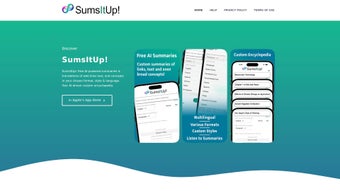
SumsItUp is a cloud‑based AI text summarizer that transforms long articles, reports, or any block of text into concise, readable summaries in a matter of seconds. Built on state‑of‑the‑art natural language processing models, the tool understands context, extracts key ideas, and repackages them according to the user’s chosen format—whether that’s a traditional paragraph, a bullet‑point list, or even a creative poem. What truly sets SumsItUp apart is its language versatility; the engine supports more than 90 languages, making it an ideal companion for global teams, multilingual researchers, and anyone who needs to digest information quickly across language barriers.
Users can fine‑tune the output with custom modifiers that steer tone, length, and focus, allowing for summaries that are formal, conversational, data‑centric, or marketing‑oriented. The platform also offers a built‑in read‑aloud feature, enhancing accessibility for visually impaired users or those who prefer auditory consumption. Because SumsItUp is a web application, there’s no need for heavyweight installations—just a browser and an internet connection.
Integration hooks let you push content from popular browsers, note‑taking apps, or collaboration tools directly into SumsItUp, streamlining workflows for students, analysts, content creators, and legal professionals alike. Whether you’re summarizing a dense financial statement, translating a technical whitepaper, or condensing a privacy policy for a quick review, SumsItUp delivers a secure, reliable, and highly customizable summarization experience.
Key Features That Make SumsItUp Stand Out
- AI‑driven summarization engine supporting 90+ languages.
- Multiple output styles: paragraph, bullet list, table, poem, and custom templates.
- Custom modifiers to control tone, length, and emphasis (e.g., “technical focus”, “marketing spin”).
- Read‑aloud functionality with natural‑sounding voice options.
- One‑click integration with browsers, Google Docs, Microsoft Teams, Slack, and Zapier.
- Secure HTTPS connection and GDPR‑compliant data handling.
- Free tier with 10 summaries per day; paid plans unlock unlimited usage and priority processing.
- Export options: plain text, PDF, Markdown, and HTML.
- Collaboration mode allowing multiple users to edit and comment on generated summaries.
- API access for developers to embed summarization into custom applications.
Each feature has been engineered to address a specific pain point in modern information workflows. The multilingual capability, for instance, eliminates the need for separate translation tools; you simply paste the source text and let SumsItUp return a concise version in the target language of your choice. The custom modifiers are especially powerful for marketers who want a brand‑aligned voice or for researchers who need to highlight methodological details.
Meanwhile, the read‑aloud feature pairs perfectly with the growing trend of “listen‑while‑you‑work,” allowing users to consume summaries hands‑free during commutes or while multitasking. Integration hooks reduce friction: a Chrome extension captures the current webpage and sends it to SumsItUp with a single click, while the Slack bot can summarize channel discussions in real time. Security is never an afterthought; all data is encrypted in transit, and the platform does not retain user content longer than necessary, ensuring compliance with privacy regulations.
Whether you’re an individual looking for a free, reliable summarizer or an enterprise seeking scalable API access, SumsItUp’s feature set is designed to adapt to diverse needs while maintaining speed and accuracy.
Installation, Usage Instructions, and Compatibility
Because SumsItUp is a web‑based solution, there is no traditional “installation” process. Users simply navigate to sumsitup.com, create a free account, and begin summarizing immediately. The onboarding flow is intuitive: after confirming your email, you are presented with a clean dashboard where you can paste text, upload documents, or paste a URL for automatic content extraction. For power users, the platform offers a Chrome/Edge extension that adds a “Summarize with SumsItUp” button to the browser toolbar, allowing you to send any webpage to the service without leaving the tab. Mobile users on iOS or Android can access the responsive web app or download the native companion app from the App Store or Google Play for an optimized touch experience.
Once inside the dashboard, follow these steps to generate a summary:
- Paste or upload the source text (supports .txt, .docx, .pdf, and .html).
- Select the source language (auto‑detect works for most cases).
- Choose the desired output format (paragraph, list, poem, etc.).
- Apply any custom modifiers—type keywords like “concise,” “technical,” or “friendly tone” into the modifier field.
- Click “Summarize.” The AI processes the content and displays the result within seconds.
- Use the toolbar to copy, download, or listen to the summary via the read‑aloud button.
SumsItUp runs on any modern operating system that supports a contemporary web browser, including Windows 10/11, macOS 12+, Linux distributions, iOS 13+, and Android 9+. Because the heavy lifting is performed on secure cloud servers, even low‑spec devices experience fast response times, and there’s no need to worry about local CPU or RAM constraints.
For teams that require deeper integration, the API documentation provides RESTful endpoints with JSON payloads, enabling you to embed summarization directly into internal tools, CRM platforms, or learning management systems. Authentication is handled via API keys, and rate‑limiting ensures fair usage across all customers. Overall, the zero‑install, cross‑platform design of SumsItUp guarantees that you can start summarizing instantly, whether you’re on a desktop workstation, a tablet in a coffee shop, or a smartphone on the go.
Pros, Cons, Frequently Asked Questions, and Final Thoughts
Pros
- Supports over 90 languages, making it truly global.
- Multiple output styles and custom modifiers for highly tailored summaries.
- Read‑aloud feature improves accessibility and multitasking.
- Seamless browser and app integrations reduce workflow friction.
- Free tier available; paid plans are competitively priced.
- Secure, GDPR‑compliant data handling.
- API access for developers and enterprises.
Cons
- Heavy reliance on internet connectivity; offline mode is not available.
- Free tier limits daily summaries, which may be restrictive for power users.
- Complex technical documents sometimes lose nuanced details despite modifiers.
- Customization UI could be more visual for non‑technical users.
FAQ – Your Quick Reference
Is SumsItUp free to use?
Yes, SumsItUp offers a free tier that allows up to 10 summaries per day. For unlimited access, you can upgrade to a paid plan starting at $9.99 per month.
Can I summarize content in languages other than English?
Absolutely. The platform supports more than 90 languages, including Spanish, Mandarin, Arabic, Russian, and many regional dialects.
How secure is my data when I use SumsItUp?
All data is transmitted over HTTPS, encrypted in transit, and processed on GDPR‑compliant servers. SumsItUp does not store your content longer than necessary for summarization.
Is there an API for developers?
Yes, SumsItUp provides a RESTful API with detailed documentation, allowing you to integrate summarization into your own applications, bots, or workflows.
Can I customize the tone of the summary?
You can use custom modifiers such as “formal,” “friendly,” “technical,” or “marketing” to influence the tone and focus of the generated summary.
Conclusion – Why You Should Download SumsItUp Today
SumsItUp delivers a powerful blend of AI accuracy, multilingual reach, and flexible output options that few competitors can match. Its cloud‑first architecture means you’re always using the latest model without manual updates, and the read‑aloud feature adds a layer of accessibility that resonates with modern work habits. While the free tier’s daily limit may prompt heavy users to consider a paid plan, the pricing is transparent and affordable, especially for teams that benefit from the API and collaboration tools. If you frequently juggle long reports, academic papers, or social media feeds and need a reliable way to distill information quickly, SumsItUp is a smart, secure, and user‑friendly solution. Download SumsItUp now to start transforming overwhelming text into clear, actionable insights—free trial included.



.png)



